Hydraulic Sizing
Calculate total filtration area, required area per duty vessel, and theoretical vessel diameter.
Design and evaluate a vertical pressure sand filter using a structured Excel workflow for hydraulic sizing, duty and standby vessel configuration, automatic manufacturer vessel selection, media sizing, expanded-bed verification, backwash requirements, and design compliance.
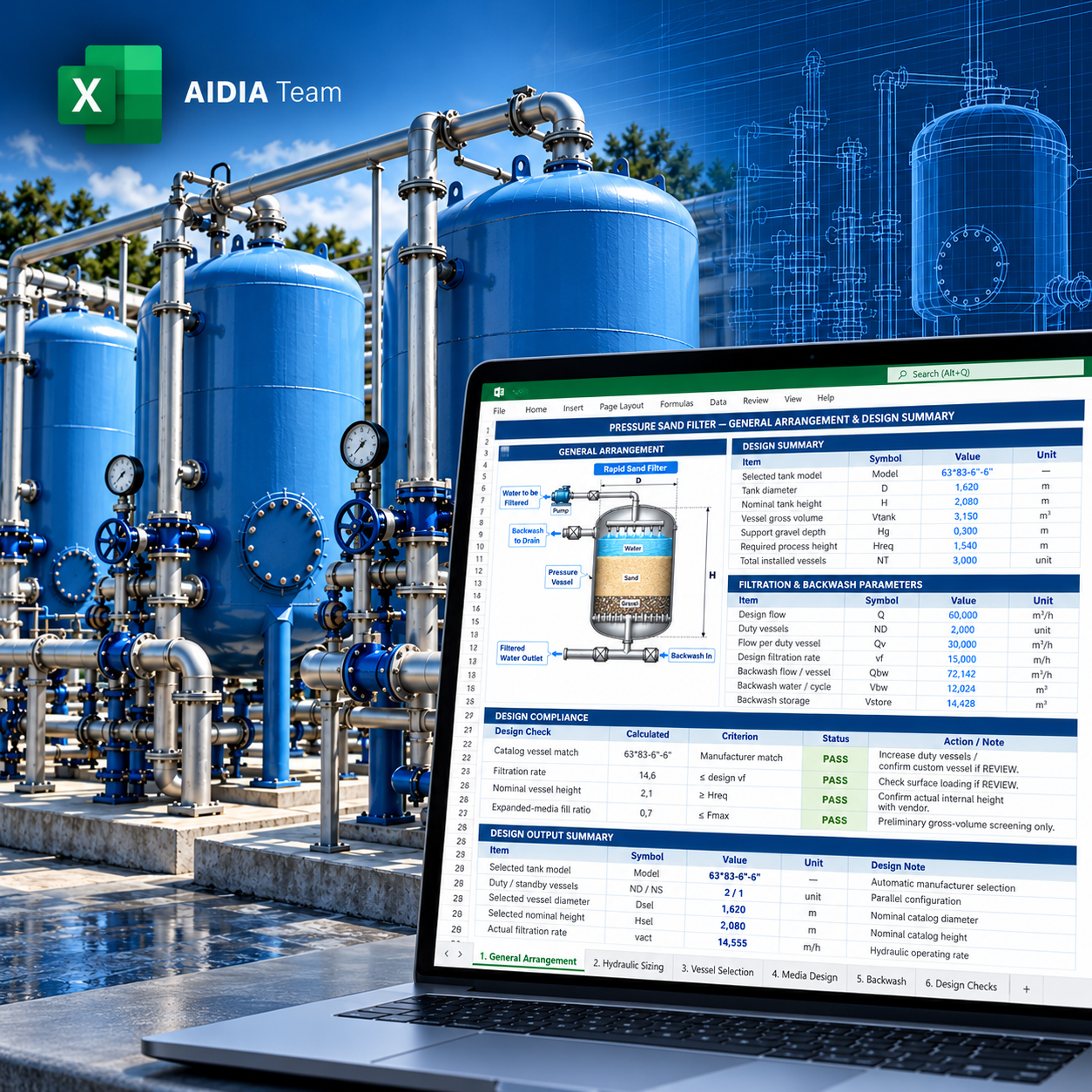
Use one calculation workflow to size a pressure sand filter system, select a preliminary standard vessel, define filter media, estimate backwash demand, and review the selected configuration before vendor confirmation.
Calculate total filtration area, required area per duty vessel, and theoretical vessel diameter.
Automatically identify the first eligible catalog vessel from the integrated manufacturer database.
Calculate sand and support-gravel volumes using the selected vessel area and media depths.
Evaluate expanded sand depth, total expanded-media volume, and vessel fill ratio during backwash.
Determine backwash flow per vessel, water per cycle, and recommended storage including operating allowance.
Review vessel availability, filtration loading, process-height margin, expanded-media fill, and overall status.
The workbook connects the project design flow to a preliminary pressure-vessel configuration and its key media and backwash requirements.
Design flow, vessel-selection mode, standby philosophy, filtration rate, media depths, and backwash inputs.
Total required area, duty-vessel quantity, flow per vessel, and area required per vessel.
Theoretical vessel diameter derived from the required hydraulic area.
Integrated vessel database for preliminary catalog model, diameter, nominal height, gross volume, and weight.
Recalculate actual area and operating filtration rate using the selected vessel dimensions.
Check vessel height against underdrain clearance, support gravel, expanded sand bed, and upper clear space.
Sand volume, support-gravel volume, expanded sand depth, and expanded total media volume.
Backwash flow, cycle volume, duration, and recommended storage requirement.
Automatic PASS / REVIEW logic for the selected preliminary configuration.
A clear sequence from design basis to a reviewable vessel configuration.
Set flow, filtration rate, media, and backwash inputs.
Calculate total area and duty-vessel requirement.
Screen the integrated catalog for a suitable preliminary model.
Calculate sand, gravel, and expanded-bed requirements.
Determine backwash flow, water per cycle, and storage.
Check the selected vessel and overall PASS / REVIEW status.
Actual screenshots from the Pressure Sand Filter Design workbook. The public preview shows the workbook structure and output format without exposing the complete internal methodology.
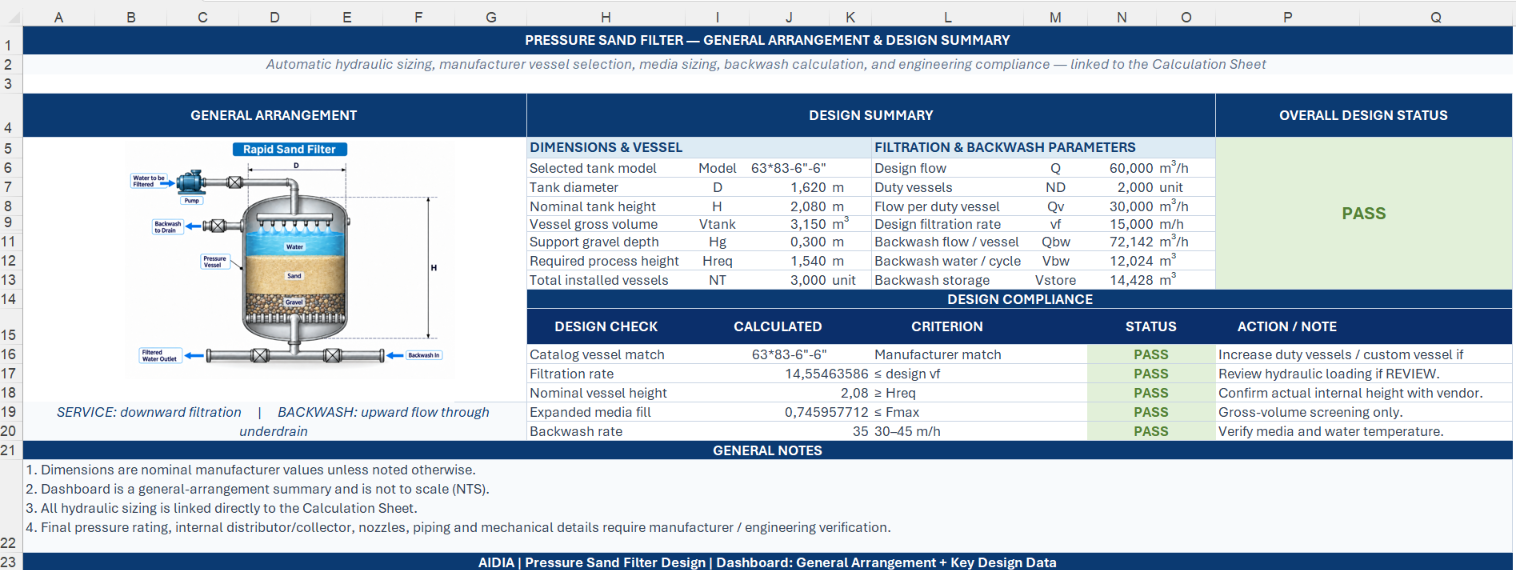
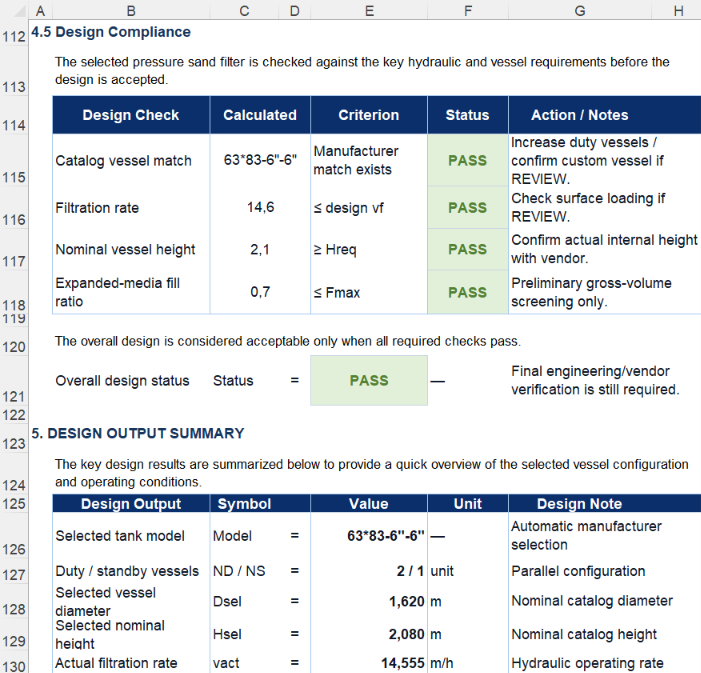
The workbook keeps the hydraulic sizing, catalog selection, media requirement, backwash demand, and design status connected to the same design basis.
| Design Area | Key Review Output | Engineering Purpose |
|---|---|---|
| Hydraulic sizing | Total filtration area and duty vessels | Establish filter capacity and parallel configuration |
| Vessel selection | Catalog model, diameter, nominal height | Select a preliminary standard vessel |
| Operating rate | Actual filtration rate | Confirm selected vessel area is hydraulically acceptable |
| Media design | Sand, gravel, expanded media | Establish filter-media and backwash-volume requirements |
| Backwash | Flow, cycle water, storage | Define the preliminary backwash-water requirement |
The workbook keeps the hydraulic basis, required filtration area, catalog screening, and selected-vessel performance connected in one traceable design path.
Start from the project flow and adopted filtration loading.
Required total filtration area before catalog-vessel screening.
Eligible vessel is screened against area, process height, and programmed design checks.
The workbook automatically flags whether the preliminary selected configuration satisfies the programmed review conditions.
| Check Item | Workbook Review | Why It Matters | Status Output |
|---|---|---|---|
| Catalog vessel match | Confirms an eligible catalog vessel is found | Avoids forcing a configuration when no standard match exists | PASS / REVIEW |
| Filtration rate | Compares actual loading against the selected design basis | Confirms hydraulic surface loading remains acceptable | PASS / REVIEW |
| Nominal vessel height | Compares vessel height with required process height | Provides preliminary vertical-space screening | PASS / REVIEW |
| Expanded-media fill | Reviews expanded media against gross vessel volume | Checks preliminary free volume during backwash | PASS / REVIEW |
| Overall design status | Summarizes programmed checks | Highlights whether the preliminary configuration requires revision | PASS / REVIEW |
A standardized AIDIA workbook structure for calculation, documentation, and engineering review.
Purpose, instructions, calculation basis, responsibility notes, and support information.
Project information and revision fields for engineering documentation.
Hydraulic sizing, vessel screening, media sizing, backwash calculation, and compliance review.
General arrangement, design summary, key parameters, and overall design status.
Engineering symbols, terminology, and units used throughout the module.
Integrated manufacturer vessel data used for preliminary automatic screening.
Explore other AIDIA water and wastewater calculation modules.
Bring hydraulic sizing, vessel selection, media requirements, backwash demand, and design review into one structured AIDIA Excel workflow.