Finding design basis
Collecting flow, water quality and project requirements.
AIDIA helps engineers perform common water and wastewater design calculations through structured Excel modules with transparent formulas, engineering criteria, automated checks, and review-ready outputs.
Much of an engineer’s time is spent around the calculation — finding references, tracing formulas, checking criteria, and keeping workbooks consistent.
Collecting flow, water quality and project requirements.
Looking through references and design guidelines.
Copying and modifying previous project workbooks.
Understanding how outputs were actually calculated.
Different formats and logic across projects.
Rechecking calculations and criteria every time.
Engineering spreadsheets often grow from old project files, textbook equations and repeated revisions. They work, but over time they can become difficult to trace, standardize and share.
AIDIA was created to turn that scattered engineering knowledge into a more structured workflow — with consistent layouts, clear formulas, built-in criteria checks, and outputs that are easier to review and reuse.
Enter project data and design parameters.
Apply transparent formulas.
Check against relevant standards.
Automatic checks and flagging.
Calculate and size key equipment.
Generate review-ready outputs.
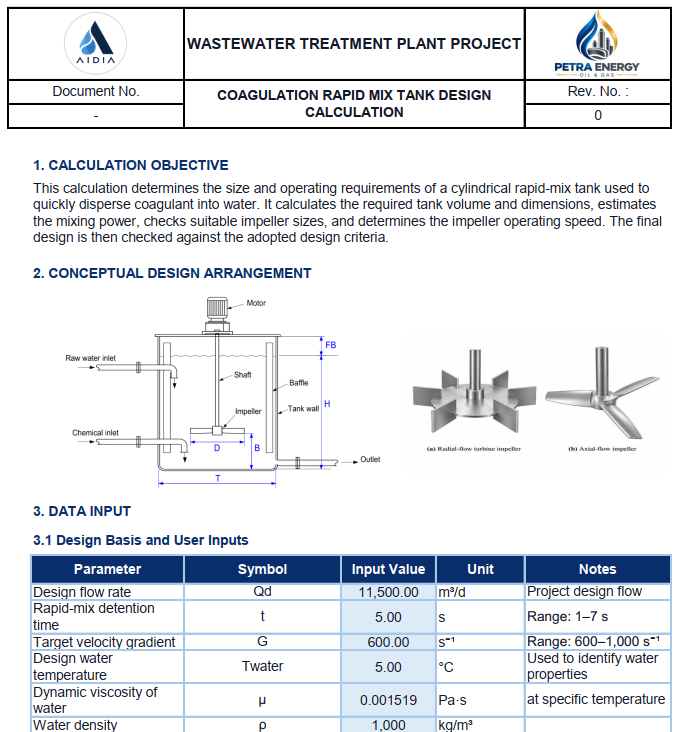
Click each sheet tab to preview the real workbook structure. The screenshots below are taken from the Coagulation Rapid Mix Tank Design module.
Start with preliminary sizing in the browser. Each calculator explains its assumptions and shows which detailed engineering checks are included in the Excel workbook.
Theoretical vessel diameter, internal height and media volumes.
Try Free CalculatorPreliminary tank geometry and theoretical mixing power.
Try Free CalculatorSettling surface area and theoretical basin dimensions.
Try Free CalculatorNo purchase required to use these preliminary calculators. Results are for engineering support only and do not replace detailed checks, professional judgement or vendor confirmation.
Modular tools for water and wastewater design.
Explore engineering articles, technical guides, and upcoming ebooks from AIDIA.
Principles, calculations, and design considerations for sedimentation basins.
Read more →Design principles, evaluation stages, and engineering considerations for gravity thickener selection.
Read more →Mixing intensity, floc development, tapered staging, and practical selection considerations.
Read more →Residence time, effective tank volume, hydraulic distribution, and practical design considerations.
Read more →Design and evaluate treatment processes.
Prepare calculations for client projects.
Deliver consistent, professional workbooks.
Learn and apply standard methods.
Standardize calculations across projects.
From calculation modules to engineering system.
AIDIA is being developed as a modular engineering ecosystem, with calculation modules as the foundation for a more complete set of engineering tools.
Key questions about how AIDIA modules are intended to be used.
Each product page outlines its calculation scope, design inputs, checks and workbook previews. Sheet contents differ by module; review the specific product page before purchasing.
AIDIA focuses on traceable calculations and visible engineering assumptions. The included formula structure, design criteria and references depend on the individual workbook. Check its preview and calculation coverage for details.
Products are supplied as Excel workbooks. Compatibility may differ across Excel desktop, web, mobile and alternative spreadsheet applications. If a particular Excel version or device is essential, contact support before purchasing for module-specific confirmation.
AIDIA workbooks support engineering calculations, but permission for commercial, team or multi-user use must be confirmed under the applicable product license. Read the usage notice or request written clarification before purchase.
No. Redistribution, resale, rebranding and sharing of AIDIA workbooks are not permitted. For team or organizational needs, contact AIDIA to clarify authorization.
Choose Buy in Indonesia to open the product's LYNK checkout, or International Checkout to open its Payhip checkout. Prices, currencies, payment options and digital-delivery details are shown by the respective checkout provider. Learn about checkout and orders.
Email aidia.engineering@gmail.com with the module name, checkout platform and order reference if available. Do not share payment-card numbers or passwords. Visit Support.
Review the product and checkout provider's terms before paying. Refund or cancellation eligibility is not stated as a blanket policy on this website; contact AIDIA with the order details to request clarification. See checkout guidance.
No. AIDIA supports engineering calculations but does not replace professional judgement, project requirements, applicable regulations, design review or manufacturer/vendor confirmation.